毕业设计—基于Python的搜索引擎实现!毕设都这么容易吗?
前言
1.实现
1.1 系统架构
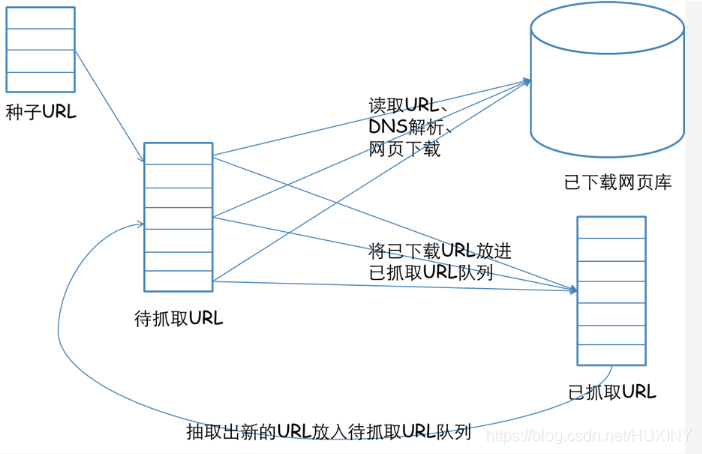
信息采集模块
信息处理模块
建立索引模块
查询和 web 交互模块
爬取数据
中文分词
相关度排序
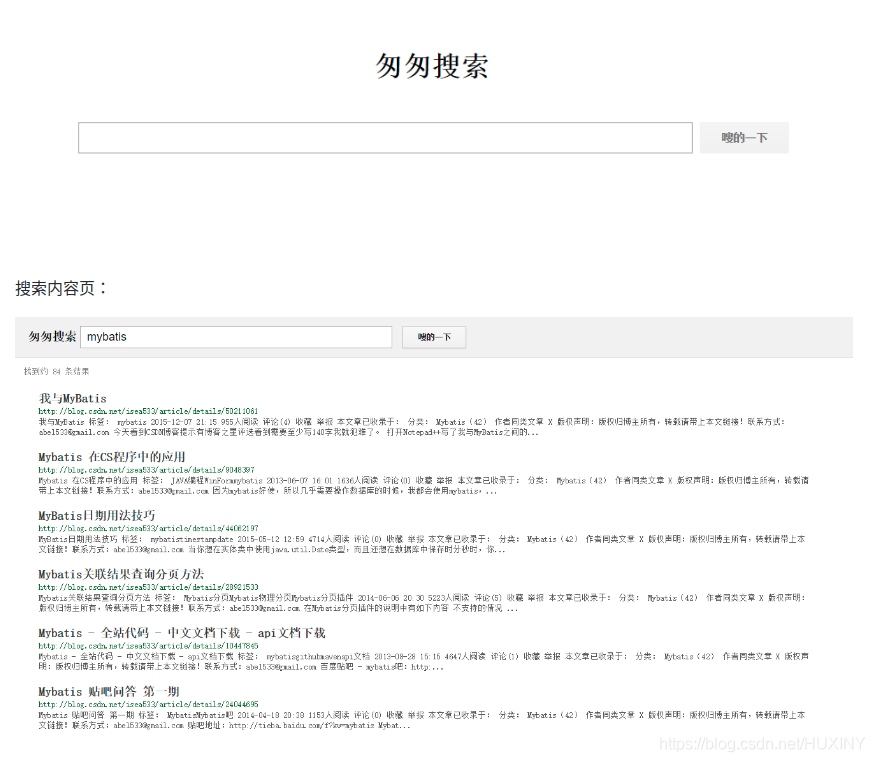
建立web交互。
1.2 爬取大量网页数据
# encoding=utf-8
# 导入爬虫包
from selenium import webdriver
# 睡眠时间
import time
import re
import os
import requests
# 打开编码方式utf-8打开

# 睡眠时间 传入int为休息时间,页面加载和网速的原因 需要给网页加载页面元素的时间
def s(int):
    time.sleep(int)


# html/body/div[1]/table/tbody/tr[2]/td[1]/input
# http://dmfy.emindsoft.com.cn/common/toDoubleexamp.do

if __name__ == '__main__':
    #查询的文件位置
   # fR = open('D:	est.txt','r',encoding = 'utf-8')

    # 模拟浏览器,使用谷歌浏览器,将chromedriver.exe复制到谷歌浏览器的文件夹内
    chromedriver = r"C:UserszhaofahuAppDataLocalGoogleChromeApplicationchromedriver.exe"
    # 设置浏览器
    os.environ["webdriver.chrome.driver"] = chromedriver
    browser = webdriver.Chrome(chromedriver)
    # 最大化窗口 用不用都行
    browser.maximize_window()
  #  header = {'user-agent': 'Mozilla/5.0 (Windows NT 10.0; Win64; x64) AppleWebKit/537.36 (KHTML, like Gecko) Chrome/69.0.3497.100 Safari/537.36'}

    # 要爬取的网页
    neirongs = []  # 网页内容
    response = []  # 网页数据
    travel_urls = []
    urls = []
    titles = []
    writefile = open("docs.txt", 'w', encoding='UTF-8')
    url = 'http://travel.yunnan.cn/yjgl/index.shtml'
    # 第一页
    browser.get(url)
    response.append(browser.page_source)
    # 休息时间
    s(3)

    # 第二页的网页数据
    #browser.find_element_by_xpath('// *[ @ id = "downpage"]').click()
    #s(3)
    #response.append(browser.page_source)
    #s(3)

    # 第三页的网页数据
    #browser.find_element_by_xpath('// *[ @ id = "downpage"]').click()
    #s(3)
    #response.append(browser.page_source)


    # 3.用正则表达式来删选数据
    reg = r'href="(//travel.yunnan.cn/system.*?)"'
    # 从数据里爬取data。。。
    # 。travel_urls 旅游信息网址
    for i in range(len(response)):
        travel_urls = re.findall(reg, response[i])

    # 打印出来放在一个列表里
    for i in range(len(travel_urls)):
        url1 = 'http:' + travel_urls[i]
        urls.append(url1)
        browser.get(url1)
        content = browser.find_element_by_xpath('/html/body/div[7]/div[1]/div[3]').text
        # 获取标题作为文件名
        b = browser.page_source
        travel_name = browser.find_element_by_xpath('//*[@id="layer213"]').text
        titles.append(travel_name)
    print(titles)
    print(urls)
    for j in range(len(titles)):
        writefile.write(str(j) + '		' + titles[j] + '		' + str(urls[j])+'
')

    s(1)
    browser.close()
1.3 中文分词
1.4 相关度排序
第1个排名算法:根据单词位置进行评分的函数
 # 根据单词位置进行评分的函数.
    # rows是[(urlid1,wordlocation1_1,wordlocation1_2,wordlocation1_3...),(urlid2,wordlocation2_1,wordlocation2_2,wordlocation2_3...)]
    def locationscore(self,rows):
        locations=dict([(row[0],1000000) for row in rows])
        for row in rows:
            loc=sum(row[1:]) #计算每个链接的单词位置总和,越小说明越靠前
            if loc<locations[row[0]]:  #记录每个链接最小的一种位置组合
                locations[row[0]]=loc

        return self.normalizescores(locations,smallIsBetter=1)
第2个排名算法:根据单词频度进行评价的函数
# 根据单词频度进行评价的函数
    # rows是[(urlid1,wordlocation1_1,wordlocation1_2,wordlocation1_3...),(urlid2,wordlocation2_1,wordlocation2_2,wordlocation2_3...)]
    def frequencyscore(self,rows):
        counts=dict([(row[0],0) for row in rows])
        for row in rows:
            counts[row[0]]+=1   #统计每个链接出现的组合数目。 每个链接只要有一种位置组合就会保存一个元组。所以链接所拥有的组合数,能一定程度上表示单词出现的多少。
        return self.normalizescores(counts)
第3个排名算法:根据单词距离进行评价的函数
# 根据单词距离进行评价的函数。
    # rows是[(urlid1,wordlocation1_1,wordlocation1_2,wordlocation1_3...),(urlid2,wordlocation2_1,wordlocation2_2,wordlocation2_3...)]
    def distancescore(self,rows):
        # 如果仅查询了一个单词,则得分都一样
        if len(rows[0])<=2: return dict([(row[0],1.0) for row in rows])

        # 初始化字典,并填入一个很大的值
        mindistance=dict([(row[0],1000000) for row in rows])

        for row in rows:
            dist=sum([abs(row[i]-row[i-1]) for i in range(2,len(row))]) # 计算每种组合中每个单词之间的距离
            if dist<mindistance[row[0]]:  # 计算每个链接所有组合的距离。并为每个链接记录最小的距离
                mindistance[row[0]]=dist
        return self.normalizescores(mindistance,smallIsBetter=1)
1.5 建立web交互
本文链接:https://www.wstdnwx.com/?id=588 转载需授权!
目录 返回
首页